
8 DevOps Mistakes Every Development Team Should Avoid
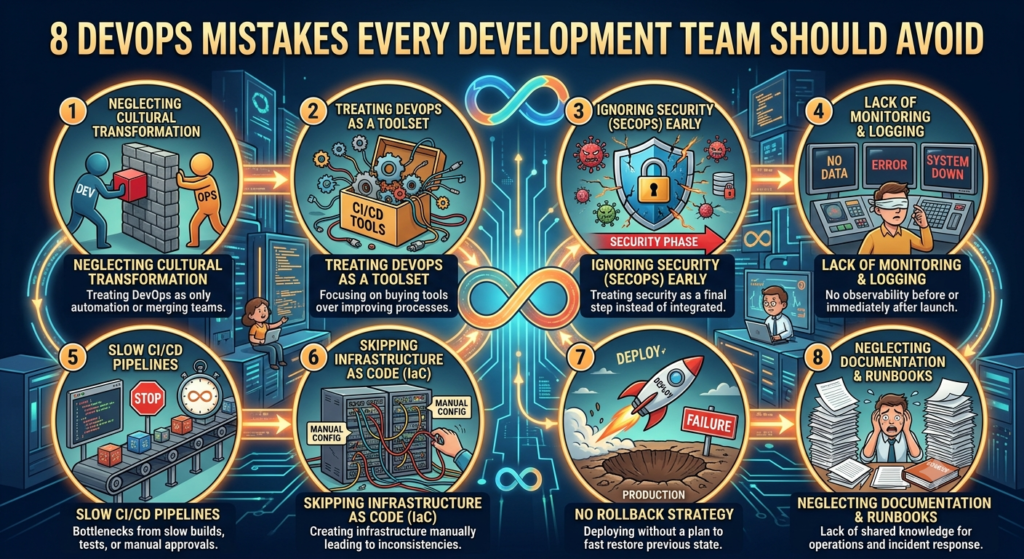
8 DevOps Mistakes Every Development Team Should Avoid
Software development is much faster today than it was a few years ago. New features, bug fixes and updates are released nearly every day. People expect apps and websites to work perfectly without any delay or error.
That is why so many companies use DevOps. Developers and operations teams working together is useful. It also makes software delivery faster, smoother and more dependable. With cloud computing, this process has become easier, as it provides teams with the flexible resources they need when they need them.
But having DevOps tools doesn’t mean a team is doing DevOps correctly. Many common DevOps mistakes companies are still making. These types of errors can hold up projects, create new bugs and even add to the cost.
The good news is that most of these problems are easy to prevent. Once you know them, your team can build better software and release it with more confidence.
Let’s look at the first four mistakes that many development teams still make.
Why DevOps Matters DevOps is not just about new tools.
It’s about helping people to work better together.
In many companies, developers write the code, while another team handles testing and deployment. When those teams don’t coordinate well, things go wrong. Some features could work on one computer but not when they go live.
DevOps solves this issue by bringing everyone together. Developers, testers, operations, and security teams all have the same goal.
So software gets delivered faster, bugs get fixed faster, and customers have a better experience.
But even the most capable teams can make DevOps mistakes if they ignore simple best practices.
1. Thinking DevOps is All About Tools This assumption is one of the worst mistakes.
Some companies install tools like Jenkins, Docker or Kubernetes and believe that they are doing DevOps.
But it’s not like that.
DevOps is a culture, not tools.
Imagine paying for an expensive gym membership and never going to the gym. But membership alone will not make you healthy.
The same idea is at work here.
DevOps tools are useful, but they only work well when people talk and work as one team.
For example, deployment issues can occur when developers complete their work and simply throw everything over the wall to the operations team without any discussion.
Instead, the two teams should cooperate from the start. They are meant to share ideas, work together on problems, and take responsibility for the final product.
How to avoid it: encourage teamwork.
- Share project objectives.
- Have regular meetings.
- Get all teams involved early in the project.
Good teamwork is the heart of successful DevOps.
Read more: Small Business Logo Maker Agency that Makes You Stand Out Quickly
2. Automating a Dirty Process: Automation is one of the best things about DevOps.
It’s time-saving and labour-saving.
But many teams dive into automation without testing whether their process is already working well.
It gives us new problems instead of solving the old ones.
Think about a messy kitchen.
If you cook faster in a messy kitchen, you will still waste time looking for ingredients and cleaning up.
Software development is no different.
If your workflow is confusing, automation won’t fix it. It will simply make the confusion happen faster.
Before using automation, look at your current process.
Ask yourself:
- Are there unnecessary steps?
- Can anything be simplified?
- Are all people aware of their responsibility?
Once you know how to do it, automation is much more effective.
3. Skipping Testing Until the End
Many teams wait until development is finished before testing their software.
Such an approach is risky.
A small bug found at the end of a project can take hours or even days to fix.
Occasionally it delays the entire release.
Instead, testing should happen during every stage of development.
Say you’re making a house, for example.
You wouldn’t wait until the house is complete to check if the foundation is strong.
You would inspect everything step by step.
Software works the same way.
Testing can help developers to catch problems early when they are much easier to fix.
Good teams use different types of testing, such as: Unit testing, integration testing Performance Exam Security testing Finding bugs early in the process saves time, money and many headaches.
It also helps avoid many common DevOps mistakes before customers ever notice them.
4. Leaving Security for the Last Step
Many teams think about security only when the project is almost finished.
This approach is another common mistake.
If you identify security problems, you may need to re-implement parts of the application at the end.
The process takes more time and delays the release.
A better way is to look at security from day one.
For example, if a developer inadvertently stores passwords in clear text, it’s much easier to fix that mistake in development than after thousands of users have created accounts.
Simple security checks during development can save you far bigger problems down the road.
Your team should regularly: 1. Check your code for security vulnerabilities.
- Update your software libraries.
- Check user permissions.
- Protect passwords and sensitive data.
Security should be part of every project, not just the final checklist.
“If everybody is responsible for security, the software will be more secure and more reliable.”
5. Not Keeping an Eye on Your Application After Release
A lot of teams breathe a sigh of relief once the software goes live. The release is done, everyone celebrates, and the team moves on to the next project.
The problem is that users don’t always use your software the way you expected.
Or maybe a feature that worked perfectly in testing starts loading slowly when thousands of people use it at the same time. Or perhaps a button doesn’t work on certain devices. These are the kinds of issues you usually won’t find until the software is in the hands of real users.
That’s why monitoring is so important.
It is good for seeing what is going on behind the scenes. If the team finds an issue early on, they can fix it before it impacts many users.
Think of it like this. The owner of a restaurant never stops watching the kitchen after it opens its doors. They watch everything during the day to be sure the customers are being taken care of.
Software requires the same attention.
Good monitoring lets you answer questions like ‘Is the application working fine?’
- Are users experiencing unexpected errors?
- Is the server busy?
- Did the latest update create a new problem?
Finding these answers early can save your team a lot of time and protect your users’ experience.
6. Using Every New Tool That Comes Along
The DevOps world moves fast. Every few months, a new tool promises to make development easier or deployments faster.
It’s tempting to try them all.
The problem is that every new tool has a learning curve. It has to be installed, maintained, upgraded and trained on. Before long, your team is spending more time managing tools than building software.
A smaller set of tools that work well together is often a better choice.
Before adding another platform, ask a simple question.
Do we really need it?
If your current tools already solve the problem, there’s no reason to replace them just because something new is popular.
Good DevOps isn’t about having the biggest toolbox.
It’s about choosing the right tools and using them well.
7. Assuming Everyone Will Remember Everything
Every developer has said this at least once.
“I’ll remember how I did this.”
A few months later, they open the same project and can’t remember half of it.
That’s completely normal.
Projects change. Teams grow. People switch jobs. Without documentation, even small tasks can become frustrating.
Imagine a new developer joining your team.
Instead of spending their first day learning the project, they spend it asking questions like:
“How do I run the application?”
“Which server should I use?”
“Where are the environment files?”
Simple documentation answers these questions before they need to be asked.
It doesn’t have to be perfect.
Even a short guide can save hours of confusion later.
Documentation isn’t extra work.
It’s something your future team will thank you for.
8. Chasing Speed and Forgetting Quality
Everyone likes fast releases.
New features are popular with customers. Getting to market quickly is popular with businesses.
But rushing does not mean taking shortcuts.
Imagine buying a new phone. It arrives earlier than expected, but the camera doesn’t work and the battery drains in two hours.
You probably wouldn’t be impressed just because it arrived quickly.
Software is no different.
A release full of bugs creates more work than it saves. Developers end up fixing emergency issues instead of building new features.
Sometimes taking one extra day to test an application is much better than spending the next two weeks solving problems in production.
Good DevOps teams understand this balance.
They don’t aim to release software as fast as possible.
They aim to release software that people can actually trust.
Concluding Thoughts DevOps is not about using the latest tools or every new trend.
It’s really about helping teams collaborate better and ship software people love to use.
Most of the DevOps mistakes are not due to lack of skills of developers. They occur because teams speed up the process, skip important steps, or stop improving once a system is in place.
The good news is that these mistakes are easy to fix.
Keep your workflow simple. Talk to your teammates. Test your software often. Monitor it after every release. And don’t be afraid to improve your process as your team grows.
Small changes made consistently usually have a bigger impact than one huge change made once.
Frequently Asked Questions
1. What are the most common DevOps mistakes?
Poor communication, skipping testing, ignoring security, using too many tools, not monitoring applications after release and keeping little or no documentation are common DevOps mistakes.
2. Why is monitoring important in DevOps?
Teams find out problems after the release with monitoring. It shows how the app is doing and helps developers fix issues before more users are impacted.
3. Can small businesses benefit from DevOps?
Yes. DevOps isn’t just for the big players. Even a small team can reap the benefits of DevOps practices like better collaboration, automating recurring tasks, and smoother software releases.
4. How does cloud computing support DevOps?
Cloud computing offers scalable infrastructure for testing, deployment and scaling to development teams. It also accelerates and simplifies software delivery.
Dubai Syndicate Community ✨Pritika Kumar representing JustBlogo for the first time at their event..